
Usage
Comments
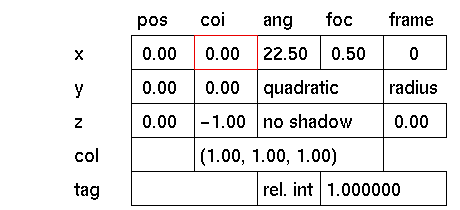
Click the x, y or z input box to activate it. In response to the prompt, type the value
you wish the x, y or z position of the coi for the spotlight to be. Press
The values are relative to the spotlights position. e.a. When using the values: x=0, y=0, z=1, the spotlight will always be directed
along the z-axis regardless of the position of the spotlight. By positioning the coi further away from the spotlight, the yellow cone representing
the spotlight will appear larger on the screen. This is for display in wire frame only
and will not effect the angle and focus of the spotlight. i.e. The values x=0, y=0, z=1 will have the same effect as the values x=0, y=0,
z=15.


