
Purpose
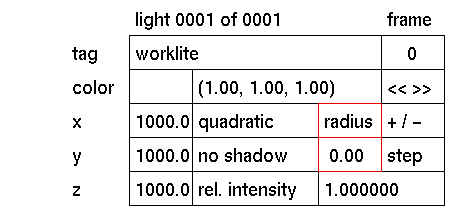
Soft shadows can be generated by defining a radius for the light source. The larger the radius, the larger the soft area of the shadow.
Usage
The default radius is 0.0 which results in a hard shadow. To create a softer shadow, increase the radius value.
Comments
To create soft shadows, the radius for light sources far away should be larger than for light sources closer to the scene.
The quality of the part of the image containing soft shadows can be changed using the soft shadow input box in the render options menu.
Using a radius larger than (0.0) increases rendering time.
Radius can not be animated.


